



We work with a lot of leadership teams rolling out AI-powered workflows and agentic tools to frontline employees. Teams are taking bigger swings, building increasingly sophisticated internal tools that look and behave more like full-fledged products. But they consistently underestimate how much learning and iteration is required after those tools go live.
Recently, I spent a few hours with a sales rep at a public technology company with more than $1 billion in annual revenue, testing whether its new AI assistant could actually help him find accounts worth pursuing. Like many reps, he has a quota, and hitting it means figuring out which accounts are worth his time. Every hour spent on the wrong account is an hour he can’t spend selling.
His team had previously used Claude to search millions of rows of noisy CRM data for potential leads. When usage became too expensive, the company replaced it with a homegrown assistant connected to its sales stack.
They weren’t crazy to build it. At their scale, a narrower internal tool could be cheaper, safer, and better tailored to the work.
But that decision came with a responsibility many companies underestimate: once you build the tool, you become the software vendor. You have to observe how it performs, understand where it fails, incorporate frontline expertise, and keep improving it as models, data, and workflows change.
Below are three lessons we’ve learned about what it takes to make these tools effective after they go live.
1. You Can’t Improve What You Can’t See
Before we could evaluate whether the assistant was actually useful, we first had to figure out how it worked. So we started testing its boundaries.
Which systems could it access? Was the data live or cached? What actions could it take? What happened when sources disagreed? Could you create and save your own prompts?
Through trial and error we figured out the assistant could query the CRM, search email and the shared drive, access internal knowledge, and perform multi-step account research. On paper, it was powerful. But we had very little visibility into how those capabilities worked.
Sometimes it was clear a response used data from a live MCP connection. Other times, it appeared to rely on cached snapshots. Both approaches have advantages: live data is fresher but can add cost and latency, while cached data is faster and cheaper but risks becoming stale.
Those tradeoffs were largely invisible to the person expected to rely on its output.
That makes failures much harder to diagnose. When an answer looks wrong, you need to know why: Is the underlying data stale? Did the assistant search the wrong source? Did the workflow omit something important? Or did the model reason poorly over the information it had?
When you buy a mature software product, the vendor owns much of the instrumentation, debugging, and improvement behind the scenes. When you build your own AI tool, that responsibility becomes yours.
Takeaway: If you own the tool, you also need to own its observability. You can’t improve a system you can’t understand.
2. The Workflow Is More Than the Data
What separates AI tools that work in production from those that merely look impressive is the context they have about how the work actually gets done.
The assistant had access to most of the right data. It could read account records, opportunities, emails, and internal notes. But its built-in account research workflow still made recommendations we knew were wrong. It described a recently closed-lost opportunity as “live and qualified” and recommended a delinquent former customer as a promising prospect.
The issue wasn’t lack of access to data. It was knowing how to weigh the signals. A recent closed-lost opportunity outweighed older positive notes. Delinquency was an automatic disqualifier. Those judgments were obvious to the rep because he had developed them through years of doing the work, but they hadn’t been encoded into the workflow.
At that point, we stopped testing the product and started studying how he actually researched accounts. We documented a series of rules, heuristics, and exceptions that determined which information mattered, how recent it needed to be, and what should override everything else.
This is the work hiding inside a seemingly simple instruction like “research this account.”
The challenge wasn’t giving the assistant more data. It was teaching it how an experienced rep interprets the data it already had.
Takeaway: Effective AI tools combine company knowledge with the most valuable, and often hardest-to-capture, context: expert judgment.
3. Someone Has to Own the Learning Loop
Once we understood how the rep actually qualified an account, improving the assistant became much more concrete.
I recorded him walking through his process in detail, including the rules, signals, and exceptions he had developed over years of doing the work. I turned that transcript into prompts we could test against the same accounts we had just reviewed. After several passes, we had a new system prompt that reproduced much more of the rep’s qualification logic.
This is the tedious work required to make AI tools better. The loop goes like this:
- Find a variety of real examples and capture what a good answer should look like
- Extract the rules, signals, and exceptions behind those answers
- Encode that judgment into the system
- Test it against examples the system hasn’t seen
- Study the failures, update the system, and repeat
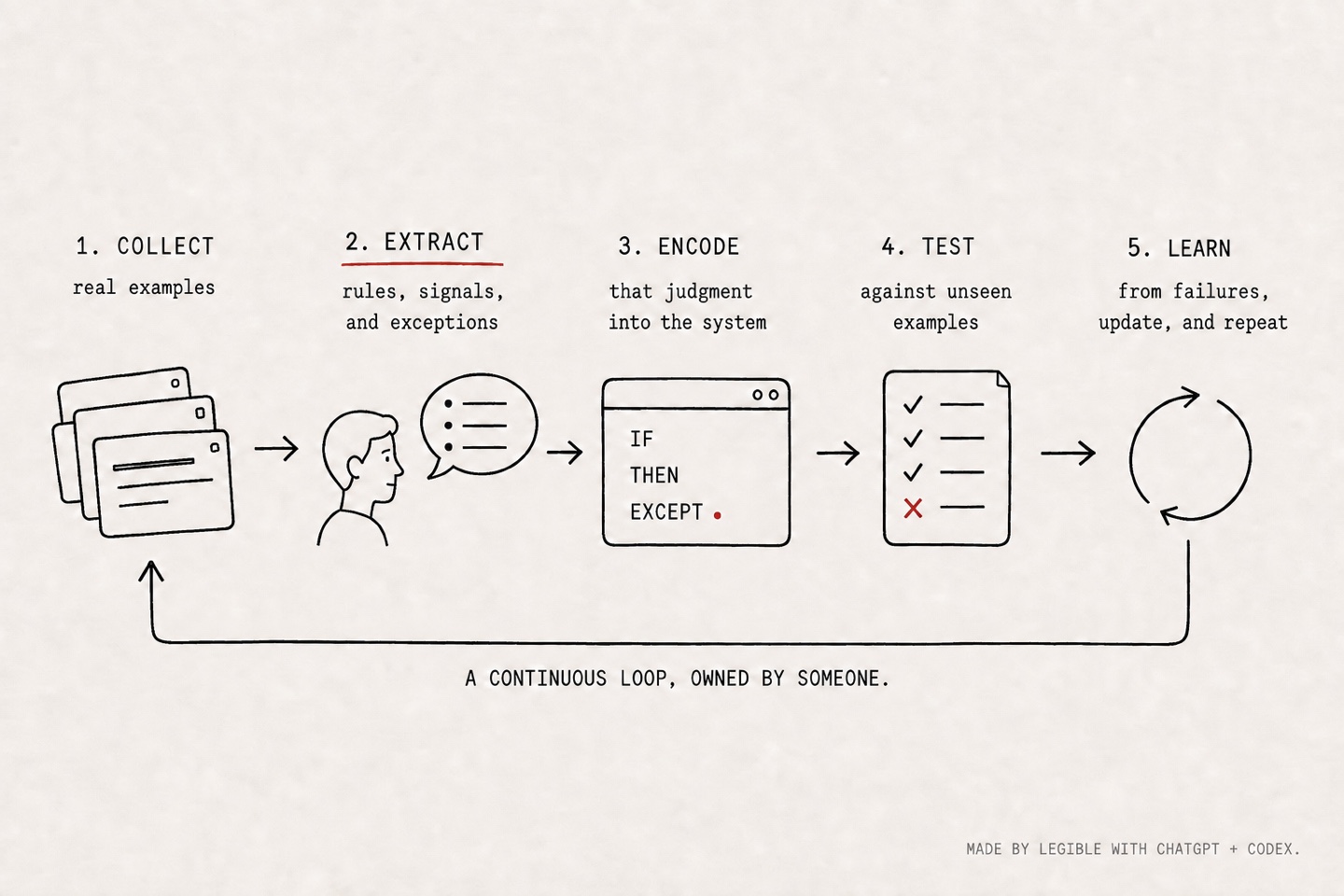
This feedback loop never really ends. New examples, edge cases, model changes, and shifts in the underlying business will keep creating reasons to revisit the system.
Once we started seeing better results, the rep started imagining how he would actually use the tool to speed up his prospecting workflow. That is the adoption the company is after. People use tools they trust, and trust is earned by consistently helping them do the job better.
But this learning loop doesn’t happen on its own. Someone has to own the process of collecting examples from frontline users, extracting what they know, turning those insights into changes, and getting those changes back into production.
Takeaway: AI adoption depends on tools being truly useful, and usefulness depends on building a continuous learning loop into the product.
Launch Is the Beginning
The assistant we tested was not a failed product by any stretch. It could access the right systems. It could retrieve useful information. It could perform work that would have been impossible to automate a few years ago.
It was simply unfinished, and that’s the point.
No vendor, internal team, or model will anticipate every judgment, edge case, or workflow before launch. AI systems become dependable by being used, challenged, observed, and improved alongside the people whose work they are meant to augment.
Once you build the tool, you become the software vendor. Launch is when the real work begins.